VidZonic AI Review 2026 + OTO's Coupon + $43,000 Free Bonus
Welcome to the VidZonic AI Review
You have a story in your head. A dragon guarding a sunken temple. A young explorer who finds a map in her grandfather’s attic.
You can see every scene. Then reality arrives. Animation takes skill, software, voice actors and weeks you don’t have.
So the idea stays in your notebook. Many creators go through this. The gap between a good idea and a finished video feels too big.
VidZonic AI promises to shrink that gap. You type an idea, a keyword or a script, and the app builds an animated story video for you.
Does it live up to that? This review shows you what it does, what it costs, what the upgrades add and where it may fall short. You can decide with all the facts in front of you.
Table of Contents
VidZonic AI Review: Introduction
VidZonic AI is an AI-powered tool designed to help you create 3D cinematic animated adventure story videos from a simple idea, keyword, or script.
It addresses the common frustration of needing multiple skills, tools, and people just to produce one video. The product is built for creators, YouTubers, freelancers, and agencies who want professional-looking animated content without learning complex software or managing a production team.
People look into it because video content performs well, yet traditional production remains out of reach for many. What makes it worth a closer look is the focus on speed, simplicity, and commercial rights in one platform.
VidZonic AI Review: Overview
GrokAI Studio at a Glance
| Product |
VidZonic AI |
| Creator | Kundan Choudhary |
| Launch Date | 7th November 2026 |
| Launch Time | 10:00 EST |
| Product type | AI video creation app (3D animated story videos) |
| Front-End Price | $17 One-Time Fee! (Lifetime Access) |
| Main purpose | Turn ideas, keywords, or scripts into animated adventure videos |
| Target audience |
Content creators, YouTubers, freelancers, agencies, and businesses |
| Guarantee | 30-Day Money-Back Guarantee |
| Niche | Marketing Education |
| Support | Еffесtіvе Rеѕроnѕе |
| Recommend | Available globally online with instant digital access. |
VidZonic AI Review: What is it?
VidZonic AI is an AI-assisted animated storytelling and video creation application.
In simple words, it is designed to help you transform written ideas into animated adventure videos without handling every traditional production task yourself.
Think of it as a digital storytelling workspace.
You begin with a creative concept. The platform’s advertised tools help develop the story, generate scenes, create cinematic visuals, add animation effects, and include AI-generated narration.
VidZonic AI Review: Who Created It?

VidZonic AI was created by Kundan Choudhary. Public launch materials list him as the product vendor. No detailed personal biography or extensive team information is provided on the official pages beyond his role in bringing the software to market. His background appears focused on digital products and AI tools aimed at creators, which aligns with the practical, results-oriented nature of this platform.
VidZonic AI Review: Key Features
The main feature helps transform ideas, niches, or keywords into 3D animated adventure video projects.
You don’t need to begin with a fully developed production plan. You can start with a simple creative concept and use the AI-assisted workflow to develop it further.
Coming up with fresh video ideas and interesting storylines can become difficult when you publish regularly.
The built-in AI Adventure Story Writer is designed to generate:
- Adventure storylines.
- Video scripts.
- Character dialogues.
- Creative story ideas.
ou can spend less time staring at a blank page and more time developing content ideas.
A good story needs suitable scenes to communicate what is happening.
VidZonic AI advertises a scene generator that transforms story concepts into visual scenes.
For example, an adventure story might involve a mysterious forest, an abandoned castle, or a hidden underground passage.
You can explore visual storytelling without manually designing every scene from scratch.
The platform advertises 3D cinematic visuals for characters, environments, and adventure scenes.
These visuals are intended to make your stories more immersive and visually interesting.
Attractive visual presentation can help communicate your story more effectively and give your content a recognizable creative style.
Static images alone may not create the experience you want from an animated adventure video.
VidZonic AI advertises animation effects designed to add movement and visual interest to generated scenes.
You can explore more dynamic storytelling instead of relying entirely on static visuals.
One interesting part of the offer is its advertised multilingual video creation capability.
VidZonic AI promotes support for more than 100 languages.
This may help creators develop content for audiences who speak different languages.
You can explore content localization without arranging a completely separate production process for every language.
The platform advertises more than 100 AI voices with different accents and delivery styles.
You can explore voice options for your animated stories instead of recording every narration yourself.
AI narration may help creators who feel uncomfortable recording their own voices or hiring voice actors for every project.
Once your video is ready, VidZonic AI advertises a one-click export function.
This is intended to simplify the process of preparing completed video projects for sharing.
You can move from video creation to publishing without managing an unnecessarily complicated export process.
VidZonic AI is advertised as a browser-based platform.
You don’t need to download and install a dedicated animation application to access the advertised service.
You can access your workspace through a compatible browser and avoid installing specialized animation software.
This may interest freelancers and video service providers who want to create eligible animated videos for clients.
It gives you the opportunity to explore offering animated storytelling as a service, subject to the actual license conditions.
Always review the license terms before selling videos or using them in commercial campaigns.
VidZonic AI Review: Benefits
By automating script generation, asset creation, and voice synthesis, you bypass days of tedious timeline editing, reducing production time to mere minutes.
You do not need to understand keyframing, motion tracking, or complex video rendering configurations; the app handles the technical pipeline behind the scenes.
You avoid paying monthly subscriptions for high-end rendering suites or hiring expensive freelance animators for basic social media content.
The platform allows you to feed the algorithms on TikTok, Instagram, and YouTube consistently with eye-catching, novel 3D visual formats that command viewer attention.
Story, scenes, visuals, voice, and export live in one dashboard. Fewer tools, fewer tabs, less friction.
VidZonic AI Review: How Does It Work?
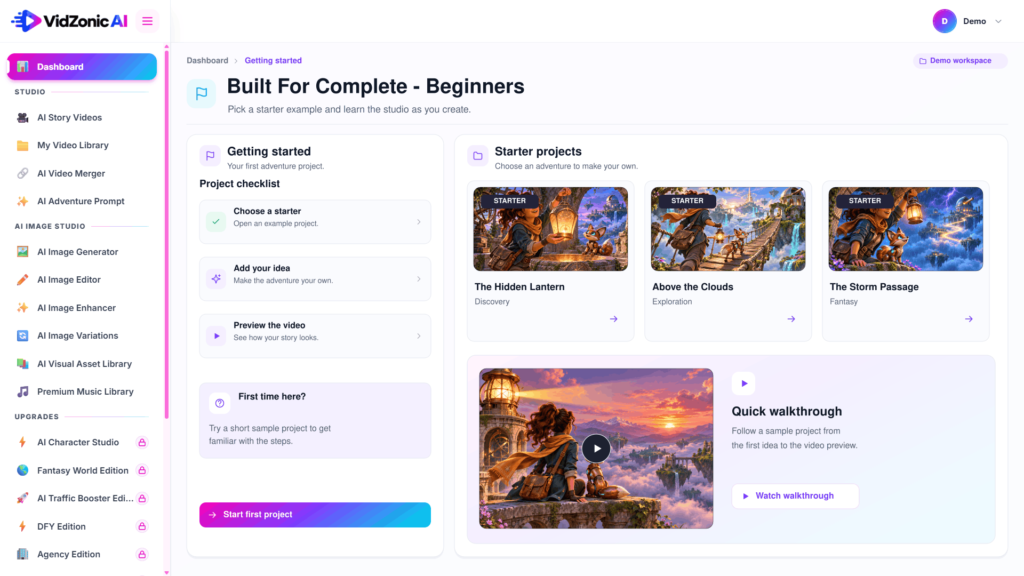
Get Access and Set Up Your Account
Log into the cloud dashboard through your web browser with no heavy software installation required.
Choose the Desired Function and Enter Required Information
Input your basic idea, prompt, or keyword into the story generator. Select your preferred 3D visual style, scene length (10, 20, or 30 seconds), and narration voice.

Generate, Refine, and Publish
Allow the AI to render the scenes. Use the built-in merger to combine clips if needed, export your finalized video file, and publish it directly to your social media channels or client delivery folders.
VidZonic AI Review: Who Should Use It?
If you need consistent video output and animation isn’t your strength, this removes the biggest bottleneck. Adventure-style animated stories are a proven format on YouTube and TikTok.
You need thumbnails, scripts, video clips, and captions — fast. GrokAI Studio could streamline that workflow.
If professional video marketing feels out of reach, this gives you a way to create promo and story-driven content without an agency budget.
If you need fresh video content to promote offers, the speed and multilingual reach help you test more angles quickly.
Suited for individuals with zero design experience who want to launch content-driven digital properties quickly.
Online entrepreneurs may want to create visual content to explain ideas, introduce products, or promote services.
VidZonic AI could be worth investigating if animated storytelling fits their marketing strategy.
VidZonic AI Review: Pros & Cons
- Beginner-friendly positioning.
- AI-powered story and script creation.
- Dedicated scene-generation tools.
- 3D cinematic animated visuals.
- Advertised support for 100+ languages.
- More than 100 advertised AI voices.
- Cloud-based access.
- One-time front-end payment advertised.
- 30-day money-back guarantee advertised.
- Requires an internet connection.
- Actual video quality needs to be evaluated.
- Front-end usage limits need confirmation.
- Some features may require paid upgrades.
- Watermark removal is advertised as a Premium Edition feature.
- Not a replacement for advanced professional animation software.
- Limited published information about the development team.
VidZonic AI Review: OTO Details Breakdown
VidZonic AI offers several optional upgrades designed for users who want more creative tools, fewer usage restrictions, automation, or additional business opportunities.
Front-End Offer (FE):
The front-end version is listed at $17. The following upgrades are optional and have separate prices. You do not need to purchase every upgrade to use the main platform.
- Get started with the main product.
- Explore the features included in the front-end plan.
- Use available AI tools for content and marketing tasks.
- Determine whether the platform suits your workflow.
- Beginners exploring AI tools.
- Affiliate marketers.
- Bloggers and content creators.
- Freelancers and small-business owners.
OTO 1: VidZonic AI Premium Edition
VidZonic AI Premium Edition is designed for users who want access to additional creative features and a more flexible video production experience. The JV page promotes watermark removal and access to more than 20 premium features.
-
Remove VidZonic AI Branding: Create videos without the standard VidZonic AI watermark, according to the offer.
-
Premium Cinematic Visuals: Explore additional visual options for animated adventure videos.
-
AI Image Generator: Create visual assets from text prompts.
-
AI Image Enhancer: Improve the appearance and detail of generated images.
-
Animated Scene Transitions: Connect scenes for smoother storytelling.
-
AI Adventure Prompt Engine: Generate prompts for stories, scenes, and characters.
-
Creative Variations: Explore different versions of images, characters, and scenes.
-
Cinematic Styling: Access additional visual styles and customization options.
-
YouTube creators who want cleaner-looking videos.
-
Freelancers producing animated content for clients.
-
Social media creators who want more creative control.
-
Users who need additional visual tools for storytelling.
OTO 2: VidZonic AI Unlimited Edition
The Unlimited Edition is designed for creators who want to produce more videos without the daily, monthly, or credit restrictions described in the JV offer.
It promotes expanded access to video creation, story generation, scene generation, AI images, voiceovers, and video exports.
-
Unlimited Adventure Video Creation: Generate more animated adventure videos without the advertised usage limits.
-
Unlimited Story Generation: Create additional storylines, scripts, and dialogues.
-
Unlimited Scene Generation: Develop more scenes for different video projects.
-
Unlimited AI Image Generation: Produce more backgrounds, objects, and visual assets.
-
Unlimited Character Creation: Develop characters for different storytelling projects.
-
Unlimited Animation Effects: Explore more animation effects and scene transitions.
-
Unlimited AI Voiceovers: Generate narration for your videos.
-
Multilingual Video Creation: Produce videos in supported languages.
-
Unlimited Video Export: Export more completed projects.
-
Unlimited Video Projects: Manage multiple creative projects.
-
Priority Processing: Access priority AI processing where supported.
-
Priority Support: Receive priority assistance according to the offer.
-
Regular YouTube content creators.
-
Faceless channel owners producing videos frequently.
-
Freelancers handling multiple client projects.
-
Agencies managing several video production tasks.
-
Creators who may find the front-end usage limits restrictive.
OTO 3: VidZonic AI Done-For-You Edition
The Done-For-You Edition is designed for buyers who prefer assistance with account setup and workspace configuration rather than arranging everything themselves.
According to the JV page, the vendor will configure the available VidZonic AI tools and organize the workspace to help buyers get started.
-
Account Setup: Get assistance setting up your VidZonic AI account.
-
Workspace Configuration: Have the video creation workspace organized.
-
Story and Scene Tool Setup: Configure available story, prompt, and scene generation tools.
-
Visual Tool Configuration: Set up available 3D visuals, environments, and character creation tools.
-
Animation Settings: Configure supported animation effects and scene transitions.
-
Voiceover Setup: Arrange available AI narration settings.
-
Export Configuration: Set up available video formats and resolution options.
-
Project Organization: Organize prompts, video projects, and creative assets where supported.
-
Commercial Workflow Setup: Configure the workflow according to your license terms.
-
Beginners who need help getting started.
-
Busy entrepreneurs who prefer setup assistance.
-
Freelancers who want an organized video production workspace.
-
Users who are less comfortable configuring software tools.
OTO 4: VidZonic AI Automation Edition
The Automation Edition is promoted as a way to automate parts of the cinematic adventure video creation workflow. Its advertised focus is on reducing repetitive work involved in story creation, scene generation, visuals, animation, narration, and exporting.
-
Automated Story Workflow: Simplify the process of preparing adventure stories.
-
Scene Creation Workflow: Reduce repetitive steps involved in creating video scenes.
-
AI Visual Workflow: Bring visual generation into a more streamlined process.
-
Animation Workflow: Simplify supported animation tasks.
-
Voiceover Workflow: Include AI narration as part of the production process.
-
Video Export Workflow: Make the final production process more convenient.
-
Reduced Manual Work: Spend less time repeating routine production steps.
-
Creators who produce animated videos regularly.
-
YouTube channel owners managing frequent uploads.
-
Freelancers handling recurring video assignments.
-
Marketers who want a more organized content workflow.
OTO 5: VidZonic AI Character Creator Edition
The Character Creator Edition is an additional AI character creation tool designed to help users develop original characters for animated adventure stories.
-
AI Character Creation: Generate unique characters for your video projects.
-
Appearance Customization: Adjust character looks to suit your story ideas.
-
Different Character Styles: Explore different visual styles.
-
Character Variations: Create alternative versions of your characters.
-
Fantasy Creature Creation: Develop imaginative creatures for fantasy adventures.
-
Sci-Fi Character Creation: Explore futuristic character concepts.
-
Original Story Characters: Build a more recognizable cast for recurring stories.
-
Animated YouTube storytellers.
-
Fantasy and adventure video creators.
-
Children’s storytelling content creators, with appropriate age-suitable content.
-
Freelancers creating character-based video projects.
-
Creators who want more control over their story characters.
OTO 6: VidZonic AI Fantasy World Edition
The Fantasy World Edition is promoted as an AI fantasy environment creator. It aims to help users develop imaginative settings for adventure stories, including magical landscapes, mystical dimensions, ancient ruins, and legendary kingdoms.
-
Fantasy Landscape Creation: Develop imaginative environments for animated stories.
-
Magical World Concepts: Explore magical settings and visual themes.
-
Mystical Dimensions: Create unusual environments for fantasy adventures.
-
Ancient Ruins: Add historic-looking locations to story scenes.
-
Legendary Kingdoms: Build fantasy-inspired worlds for storytelling.
-
Creative Worldbuilding: Give your stories distinctive settings.
-
Adventure Scene Inspiration: Explore more visual possibilities for your video projects.
-
Fantasy story creators.
-
YouTube adventure channels.
-
Animated storytelling enthusiasts.
-
Creators making fictional worlds and characters.
-
Freelancers producing fantasy-themed video content.
OTO 7: VidZonic AI Traffic Booster Edition
The Traffic Booster Edition is promoted as a video traffic and audience growth resource. Its stated purpose is to help creators improve the reach of their cinematic adventure videos across YouTube, social media, search engines, and other platforms.
This upgrade focuses on video promotion rather than the actual animation creation process.
-
Video Traffic Guidance: Explore methods for attracting viewers to your videos.
-
Audience Growth Strategies: Learn ways to build an audience around your content.
-
Engagement Improvement: Understand approaches for encouraging viewer interaction.
-
YouTube Promotion: Explore ways to improve the visibility of your YouTube content.
-
Social Media Promotion: Promote videos across relevant social platforms.
-
Search Engine Visibility: Learn about improving the discoverability of video content.
-
Content Growth Planning: Develop a more organized video promotion approach.
-
New YouTube creators.
-
Faceless channel owners.
-
Social media video publishers.
-
Freelancers promoting their video services.
-
Creators who need guidance beyond video production.
OTO 8: VidZonic AI Agency Edition
The Agency Edition is designed for users who want to manage VidZonic AI accounts for multiple customers or users.
Here, describes two options: one allowing up to 50 sub-users and another allowing unlimited users. Buyers can manage accounts through an agency dashboard and charge their own customers for access, subject to the offer’s terms.
-
50 or Unlimited Sub-Users: Choose the agency option that matches your business needs.
-
User Management: Add and manage users through the dashboard.
-
Agency Dashboard: Manage accounts from a central location.
-
Account Reselling: Offer VidZonic AI access to customers.
-
Flexible Pricing: Set your own customer pricing, according to the offer.
-
Multiple Customer Accounts: Manage more than one customer’s access.
-
Digital marketing agencies.
-
Freelancers managing several clients.
-
Software resellers.
-
Entrepreneurs building a service-based business.
-
Video production agencies that want to offer AI video creation access.
OTO 9: VidZonic AI Reseller Edition
The Reseller Edition is promoted as an opportunity to resell VidZonic AI and earn commissions from sales.
Buyers should review the reseller agreement to understand the exact sales process, commission conditions, and permitted promotional methods.
-
Reseller Rights: Get access to the advertised VidZonic AI reseller offer.
-
Product Reselling: Promote VidZonic AI to potential customers.
-
Commission Opportunity: The JV page advertises 100% commission.
-
Additional Business Model: Explore software reselling alongside your existing online business.
-
Product-Based Promotion: Promote an AI video creation platform to creators and marketers.
-
Affiliate marketers.
-
Digital entrepreneurs.
-
Software resellers.
-
Online business owners.
-
Marketers interested in promoting AI tools.
OTO 10: VidZonic AI WhiteLabel Edition
The WhiteLabel Edition is designed for buyers who want to launch a VidZonic AI-based application under their own brand.
The vendor provides white-label code, installs it on the buyer’s server, configures a domain, and adds the buyer’s logo to the application.
-
White-Label Code: Receive the advertised application code.
-
Your Own Server: Get assistance installing the code on your server.
-
Custom Domain Setup: Configure the application under your domain.
-
Your Brand Logo: Add your logo to the white-label application.
-
Branded Software: Present the application under your own business identity.
-
Independent Brand Positioning: Explore building a branded AI video software offering.
- Software entrepreneurs.
- Digital agencies.
- Established online business owners.
- Entrepreneurs interested in launching branded software.
- Marketers who want to build their own AI tool brand.
VidZonic AI Review: My Opinion: Is VidZonic AI Worth It?
Based on the available information, VidZonic AI appears interesting for people who want to explore AI-powered 3D animated storytelling.
Its biggest attraction is the combination of story writing, scene generation, animated visuals, and AI narration in one platform.
It may suit faceless YouTube creators, beginners, freelancers, and social media content creators who want to simplify their video production workflow.
However, before purchasing, I recommend checking:
-
Actual video quality and sample outputs.
-
Front-end usage limits.
-
Watermark restrictions.
-
Available export formats and video duration.
-
Features included in optional upgrades.
-
Commercial license conditions.
VidZonic AI may be worth considering if its actual output and features match your content creation needs. However, don’t expect software alone to guarantee views, clients, or income.
VidZonic AI Review: Conclusion
Creating animated videos doesn’t have to start with complicated production software or professional animation skills.
VidZonic AI aims to make the process easier by combining AI story writing, scene generation, 3D visuals, animation effects, and voiceovers.
Its advertised multilingual capabilities and commercial license may also appeal to creators and freelancers.
Although you should check the actual output quality, usage limits, and optional upgrades, the platform offers an interesting approach to animated adventure video creation.
If you want to turn your creative ideas into animated stories for YouTube, social media, or client projects, VidZonic AI deserves a closer look.
Explore the demo, review the included features, and decide whether it suits your video creation goals.
VidZonic AI Review: $43000 Bonuses
Explore listed resources related to online traffic, social media promotion, YouTube traffic, solo ads, and traffic training.
Find resources associated with Facebook, Instagram, Pinterest, Twitter, social media tools, and audience engagement.
Browse listed funnel resources, done-for-you campaigns, squeeze page tools, and materials for building marketing funnels.
Explore resources covering affiliate promotions, CPA marketing, list building, CPA training, and campaign templates.
Check out listed graphic, video, background image, headline, and other creative resources for online projects.
Review the listed website-building resources, marketing software, WordPress-related materials, and other online business tools.
A listed collection associated with WordPress building resources. Check the original page for the exact contents and access conditions.
A listed collection related to visual and creative resources. Confirm which individual items are currently available.
The page includes a Big Bonus Bundle and several additional bonus links. Visit the source to review each item.